Tuesday, April 22, 2014

Detecting Concentration

A couple of weeks ago, Sparkfun's new product post was all about the Neurosky Mindwave.  What really grabbed my attention was Nick Poole's video of his hack of using the Mindwave to bend a spoon.  That was a really fun and creative way to use EEG to interact with the physical world.  What also grabbed my attention was that it was yet another example of consumer EEG system saying that it detects "concentration", as if it were a well-known and well-defined EEG signature.  Along with terms like "focus" and "relaxation", I always felt that a word like "concentration" was too amorphous for serious consideration.  I mean, what exactly do "concentration" brain waves look like?  What is the signature?  I don't know.  But, given the coolness of Nick's demo, I decided to do some EEG Hacking to find out!


Neurosky Mindwave Electrode Setup:  I don't own a Neurosky Mindwave so I can't use that hardware to explore these "concentration" brain waves.  But, I do have an OpenBCI system, and it's pretty flexible, so I'll try that instead.  The main question is how to setup the electrodes.  Looking at the videos for the Mindwave, and looking at the Sparkfun hack pages, the Mindwave appears to use an electrode on the forehead and then another on an ear clip.  I'm assuming that the one on the ear clip is the reference electrode.  It does not appear to use a bias electrode, probably because they found that it was not needed for this body-mounted, battery-powered system.

OpenBCI Electrode Setup:  To mimic the Mindwave setup, I put a gold cup electrode on my forehead  and another on my left ear lobe.  The one on my forehead was plugged into Channel 1 of my OpenBCI board and the one on my ear lobe was used as the reference.  Because my system is not battery powered, I did use a bias electrode, which was an ear clip electrode placed on my right ear lobe (this is the first time I've tried the ear clip electrodes).  I also chose to stick another gold cup electrode on the back of my head, just to see what happened back there during this experiment.  Oh, and to attach my electrodes, I used standard Ten20 conductive paste.  My impedance check showed about 30 kOhm for each electrode, so not too bad.

Using OpenBCI (V2), 3 gold cup electrodes, and one ear clip.
Oh, and some guy's brain, too.

Procedure:  Watching Nick's video, he says that he is able to trigger the Mindwave's concentration detector by mentally counting backwards by 3, starting from 100.  This sounds pretty straight-forward and he clearly had good success with it.  Frankly, I was a little more skeptical about my own ability to make it happen.  So, in my data, to make it clear to me where I was trying to concentrate, I closed my eyes for a short period before and after my mental counting.  I did this because, by closing my eyes, I would generate strong alpha waves (10 Hz) that would clearly show up in the data.  As a result, after the test, I could look for the data between the two alpha wave recordings...this would be the period when I was concentrating.  Let's see what I got.

My First Look at the Data:  The spectrogram below shows how I typically look at an EEG recording for the first time.  Note that frequency is on the vertical axis and time is on the horizontal axis.  You can definitely see the signature of the alpha waves (that horizontal stripe around 10 Hz) at the beginning and at the end of my recording.  In the middle is the period of time when I was concentrating.  In this plot, I don't see anything interesting during the concentration portion of the test.  I just see some "noise" that looks little different from everything around it.  Bummer.

You can definitely see the alpha waves from my eyes being closed.  Good.
But, is anything happening during concentration?

Higher Frequencies?  But then I remembered reading somewhere (like in one of my own early posts?) that "concentration" was usually seen as increased activity in the higher EEG frequencies -- the so-called Beta waves (13-30 Hz).  So, I replotted the data where, this time, I zoomed way out on the frequency axis.  As you can see below, I'm now showing zero to 100 Hz.  In this new plot, you can clearly see that there is more EEG activity when I was concentrating compared to when I was not.  Now we're getting somewhere!

By zooming out to see the higher frequencies, it does look like there are more activity
in the high frequencies (20-100 Hz) when I am concentrating.  Cool!  (Note: the dark
horizontal stripe in the middle is the effect of my 60 Hz notch filter.)

Comparing the Spectra:  While spectrograms like the one above are helpful for quick qualitative views of both time and frequency, it is difficult to be quantitative with a spectrogram.  So, in the plot below, I show the average spectrum for a period of strong concentration (t = 90-130 sec) and I show the average spectrum for a period where my eyes were closed and my mind was especially quiet (t = 155-178 sec).  As can be seen below, the two spectra are definitely different, especially for frequencies above 22 Hz.

Comparing the average frequency spectrum with my eyes closed (t=90-130 sec)
to the average spectrum while concentrating (t=155-178 sec).  Note that
above 22 Hz, concentration exhibits more signal energy.

Detecting Concentration:  With the knowledge that, in my brain, "concentration" starts to show itself as increased EEG energy above 22 Hz, I can now contemplate building a concentration detector.  The key is to filter my EEG data so that I can assess the intensity of EEG activity in frequencies above 22 Hz.  Then, I'd pick a threshold to which I can compare the EEG intensity level.  If my EEG signals are stronger than my threshold, my detector would say that I am concentrating.  If I'm weaker than the threshold, my detector would say that I am not concentrating.  Sounds pretty easy, right?

Applying to My Recorded Data:  In the figure below, I apply this idea to the data that we've been discussing.  The top plot is the same spectrogram that I showed below.  The bottom plot is what happens when I filter the EEG data to show the intensity just for frequencies between 22 and 100 Hz.  You can see, the trace does indeed move up and down to reflect whether I'm concentrating or not.  Specifically, for the sustained concentration (t = 90-130 sec), my filtered EEG signal is running about 3.4 uVrms.  Then, when I close my eyes and relax (after t = 140 sec), my EEG signals drop down to about 2.0 uVrms.  So, if I were to define a threshold for detecting concentration, I might put it somewhere in the middle...say, around 2,7 uVrms.

Measuring the EEG amplitude in the 22-100 Hz frequency band.  Note how it is low while
my eyes are closed and that it goes higher while concentrating.

Feeling Some Success:  The plot above is making me pretty excited.  It suggests that I have conscious control over my EEG signals.  To date, I've only had strong success with controlling my Alpha waves (by opening and closing my eyes).  I've also had some small success with Mu waves, but they're really hard for me to get.  So, seeing this concentration-induced Beta (13-30 Hz) and Gamma (30-100 Hz) is pretty darned exciting.

Criticism: A critic reading this post might argue that I have not proven any link to concentration.  A critic might say that the increased high frequency EEG energy could just be a natural result of opening my eyes.  Based on the data shown so far, that would be a fair criticism.

Gathering More Eyes-Open Data:  To counter this criticism, the data below is from another test that I performed using the same setup.  In this test, I performed a similar procedure where I started with my eyes closed, had a period with my eyes open, and then finished with my eyes closed.  Unlike the previous test, though, I did not do my concentration exercise during the eyes-open period.  As a result, we should be able to see whether the increased high-frequency EEG activity is due to concentration or due to simply having my eyes open.

A second EEG test where I was NOT purposely concentrating during the eyes-open portion of the test.  Note that the EEG intensity is much less intense than seen during my previous test where I was purposely concentrating.

Not Concentrating:  In the plot above, you can see that there is a trend in my EEG signal strength, but that it is not related to the opening of my eyes.  At the beginning, when my eyes were closed, my high-frequency EEG signals were pretty low at 1.9 uVrms.  Then, when I opened my eyes (t = 210 sec), my EEG intensity increase only slightly to 2.0 uVrms and stayed that way for quite a while.  I think that this is strong evidence that simply opening your eyes does not specifically trigger increased Beta and Gamma activity.

Wandering Mind:  In the second half of my eyes-open period, we do see that my EEG intensity drifts upward.  Eventually, it averages about 2.5 uVrms.  Perhaps this increase reflects that I got bored and started thinking about my next EEG test.  Regardless of the reason, you'll note that even the increase to 2.5 uVrms still does not exceed the 2.7 uVrms threshold that we set a couple of paragraphs ago.  So, this small increase does not meet our criteria for "concentration".

Conclusion:  I think that this second data set is good evidence to declare that intense (>2.7 uVrms) Beta and Gamma activity is not due simply to opening my eyes.  I am feeling pretty confident that the intense high frequency EEG activity seen in the first data set is due to my concentration.  This means that Beta and Gamma activity is under my conscious control, which is the most exciting EEG result that I've had in a long time.

Next Steps:  Being under conscious control means that I could potentially use "concentration" as part of a brain-computer interface for future hacks.  I'm always looking for ways that I can try to control things in the physical world using just my brain waves.  Perhaps with some practice, I could use this technique to compete with Nick Poole in a spoon-bending competition!

Follow-Up:  I recorded my concentration level while eating breakfast, and found some really cool changes!
Follow-Up:  Interested in getting the data from this post?  Try downloading it from my github!

Friday, April 11, 2014

Impedance of Electrodes on my Head

Following from my previous post on figuring out how to get OpenBCI to measure the electrode-to-skin impedance, I figured that now is the time to actually measure the impedance of real electrodes on my actual skin.  I decided to try two types of electrodes: (1) disposable ECG electrodes and (2) re-usable gold cup EEG electrodes.  Here's the story of what I found...

On the left, I'm trying ECG electrodes.  On the right, I'm trying
gold cup EEG electrodes.  In both cases, I'm looking pretty sharp.

Disposable ECG Electrodes:  First, I decided to try some disposable ECG electrodes.  These are cheap and really easy to use.  They're not very good for using in your hair, but they're great for sticking on your forehead.  For the reference and bias connections, I used an ECG electrode on the mastoid bone behind each of my ears.  The picture below shows the pre-gelled, self-adhesive ECG electrodes that I used along with the clip-type ECG electrode wires (see this post for specific recommendations).

ECG Electrodes and Clip Leads That I Used on my Head

Once I stuck three of these electrodes on my head (forehead and behind each ear), I connected the lead wires to my OpenBCI V1 board using my homemade adapter.

Connecting the ECG Leads to my OpenBCI V1 Board.

After getting all connected, I activated the ADS1299's "Lead Off" excitation signal for the channel that was connected to the ECG electrode on my forehead.  As discussed in my previous post, the excitation signal is a 6 nA AC current source that the ADS1299 toggles at 31.2 Hz.  The flow of current through the electrode creates a voltage that can be measured by OpenBCI just like a normal EEG signal.  I configured my OpenBCI board to digitize the data and send it to the PC.  On the PC, I used the OpenBCI GUI to view the data in real time and to record it for post-test analysis.

A zoomed-in plot of the recorded waveform is shown on the left of the figure below.  As you can see, it has a fairly large amplitude of 508 uVrms.  This corresponds to an impedance of 120 kOhm.  That's really big!  Being surprised by that large value, I swapped the wires around so that I was measuring the electrode that I had been using as my reference (or "-") electrode.  As seen in the waveform above on the right, I got a very similar value.  That's not cool.

Example Waveforms Recorded While Using OpenBCI To Measure the
Electrode-to-Skin Impedance of (Left) the ECG Electrode on my
Forehead and (Right) the ECG Electrode behind my Left Ear.

Zooming out so that you can see more of my recording, the figure below shows about a minute's worth of data.  This is the full recording from which I made the excerpts shown above.  The longer view below shows the story of me recording data for one electrode (up to about t = 119), of how the signal goes away as I unplug and swap the electrode connections (from t = 120 to t = 132), and then how the signal returns once I am connected to the other electrode.  Again, you can see that I measured 120K from one electrode and 116K from the other electrode.

Zoomed-Out View of my Recordings Using the "Lead-Off Detection" Excitation
while Using Disposable ECG electrodes.

Gold Cup EEG Electrodes:  Because I found the impedance of the ECG electrodes to be surprisingly high, I tried using some gold cup EEG electrodes.  The picture below shows the electrodes and the conductive electrode paste that I used.  Like with the ECG electrodes, I put one of these on my forehead, one on the bone behind my left ear for the EEG reference and one one the bone behind my right ear as the EEG bias.

Gold Cup EEG Electrodes and Ten20 Brand EEG Paste

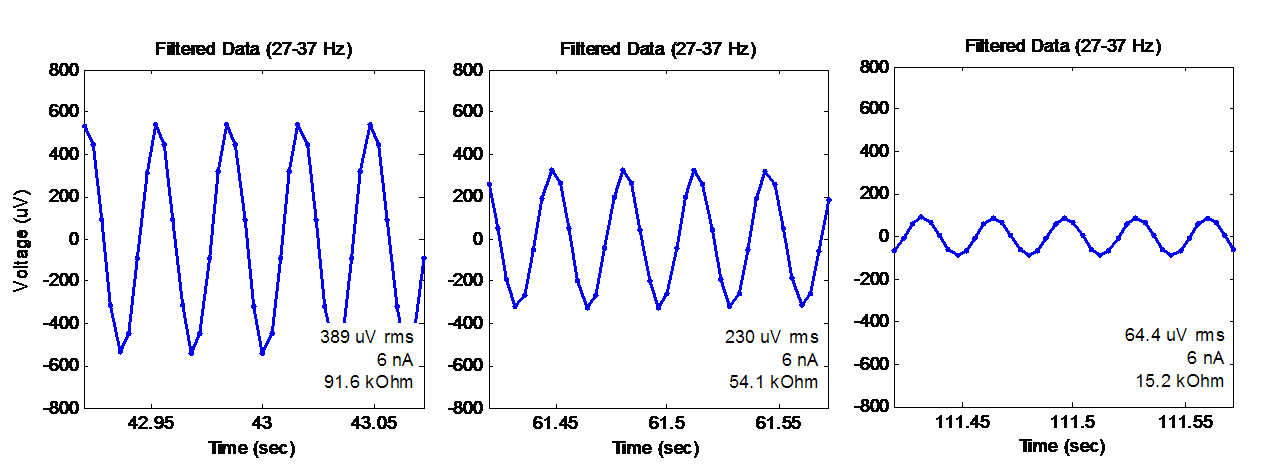
After putting on the electrodes, I activated the "Lead Off" excitation, like before.  Some examples waveforms from the data that I recorded are shown below.  As expected, the waveform shape is the same as seen before, but the amplitude is different, which reflects the fact that the impedance of the electrode-to-skin interface is different.

Waveforms Recorded from the Gold Cup Electrodes During the "Lead Off" Excitation.

Notice that the three plots show decreasing amplitude, which means that I was getting better contact and less impedance in each case.  What was happening?

Well, for the first waveform (the one on the left) was shows what I measured when I first attached the electrodes.  It shows an RMS amplitude of 389 uV, which corresponds to an impedance of approximately 92 kOhm.  This was still higher than I wanted, so I fiddled with the electrode and pushed it into my skin to try to make better contact.  That's when I got the middle graph -- 230 uV and 54 kOhm.  Finally, I pulled off the electrode, replaced the conductive paste, and really pressed and twisted the electrode against my skin.  That's when I got the graph on the right -- 64 uV, which corresponds to 15 kOhm.  That is more like the kind of value that I was hoping to see.

Below is a zoomed-out plot of the whole scenario with the gold cup electrode.  Again, this is the full record from which I made the excerpts above.  On the left side of the plot, you can see the 389 uV, 92 kOhm condition that I showed before.  Then, you can see my multiple attempts at re-seating and re-pasting the electrode.  Finally, at the end, I finally got to the 64 uV /  15 kOhm condition.  So, while it does take some effort, it is possible to improve the electrical contact between the electrode and your skin.

Zoomed-Out View of my Recordings Using the "Lead-Off Detection" Excitation
while Using the Gold Cup EEG Electrodes

Why Were the ECG Electrodes So Bad?  This experiment started with the ECG electrodes, which yielded a very high impedance of 120 kOhm.  If I could only use the ECG electrodes, this high impedance value would have prompted me to remove the electrode, to scrub the skin (hard!) with alcohol and a rough pad, and then to attach a new electrode.  Maybe this would have worked to lower the impedance, or maybe not.  If it would not have helped, the problem could be that my ECG electrodes are really old.  If you look really closely at my picture showing the electrodes, you'll see that the ECG packet in the background shows a date of "June 2012".  Yikes!  I have a friend who is developing a hacker-friendly EMG system (go FlexVolt!) who has mentioned to me that he has seen difficulty when using old ECG electrodes.  So, I'm thinking that maybe disposable electrodes have a limited shelf life...and that 2 years is maybe too old.

Next Steps:  With the impedance monitoring working on my OpenBCI board, I'm hoping that it will enable me to make more reliable EEG recordings. Hopefully, getting good low-impedance connections will increase my chances of detecting those low-level signals that have vexed me with their sometimes-I-see-them and sometimes-I-don't behavior.  In particular, I'm thinking about those pesky Mu waves that have been hard for me!  We'll see if this impedance checking can help...

Thanks for reading!

Follow-Up: Want to get the data from this post?  Try downloading it from my github!

Thursday, April 10, 2014

OpenBCI: Measuring Electrode Impedance

An important driver of EEG signal quality is how well the electrodes are electrically connected to the skin.  Common clinical and research guidance often says to use skin cleansing and skin abrasion to get the electrode-to-skin impedance down below 10 kOhm or even 5 kOhm.  If you don't, you can get noisy or unrepeatable measurements.  Most EEG systems allow you to measure the impedance at each electrode.  The OpenBCI system that I have been helping to develop is also capable of doing this (see other's work on using the ADS1299 to measure impedance) but I have not taken the time to figure out how to use it.  Until now...

Measuring Electrode Impedance Using the ADS1299's "Lead Off" 6nA Current Source

Impedance from Voltage and Current:
  The main idea with measuring the impedance of the electrode-to-skin interface is for the EEG system to inject a known current through the electrode and to measure the resulting voltage difference.  Since V = I*R, you can easily compute impedance "R" by taking the measured voltage "V" and dividing by the known current "I".  Pretty easy, right?  Well, how do you inject the current?  And how do you measure the voltage across the electrode-to-skin interface?

Injecting the Known Current:  The core of the OpenBCI board is the ADS1299 integrated circuit from Texas Instruments.  It has a feature called "Lead Off Detection" that does this trick of injecting a known current into each electrode.  As you can see in the figure above, a very small current (shown as 6 nA) is forced into the electrode line by a current source built into the ADS1299.  So, no matter how much resistance or impedance is between the current source and ground (within reason, of course), the system forces 6 nA through the electrode to ground.

What is Ground?  Unless you are sitting in salt water or touching something big and metal, it is unlikely that your body is connected to ground.  To address this, an EEG system often provides an extra connection in addition to the regular electrodes.  This extra connection is usually called something like "bias", or "driven ground", or "driven right leg (DRL)".  The purpose of this connection is to keep your body's DC voltage level within an acceptable range and to keep any common-mode AC signals in your body minimized.  Therefore, the bias line will act to source or sink whatever current as necessary (within reason) to minimize your DC and common-mode AC signals.  As a result, for the 6nA current that we are injecting, "ground" is the bias driver, as shown in the figure above.

Making a Mental Model of Where the Current Goes

Measuring Just the Electrode-to-Skin Voltage:   If the bias driver is our ground, the figure shows one way to model where the current goes.  Note that the current passes through several unknown impedances on its way to ground.   How do we evaluate just the impedance of the "+" electrode's interface to the skin?  The answer is to remember that an EEG system measures the voltage between its "+" input and its reference (or "-") input.  Because of the high-input impedance of the differential amplifier, no current flows into the "-" electrode line, so none of its impedance elements matter (for the purpose of this measurement).  Therefore, we can easily measure just the voltage drop across the first three elements -- the 5K in-series resistor, the electrode-to-skin impedance, and the impedance of a portion of the human body.  Because the series resistor is known, and because the impedance of the body is too small to matter, we have only one unknown remaining -- the impedance of the electrode-to-skin interface.

Calculating the Impedance:  The model above shows the electrode-to-skin interface as a simple resistor.  While this is not quite right (it does have a capacitive component as well), we can use this model to roughly estimate the number we need.  Following from the basic V = I*R, we shuffle the terms to get R = V/I.  We know both "V" (the measured voltage drop) and "I" (the known 6 nA current), so we easily get "R".  The only trick is to make sure that you're using compatible units for voltage and current.  In my case, I'm measuring the voltage as an *RMS* value (not an amplitude value).  My current value (6 nA), however, is an amplitude value, not an rms value.  So, to make the units compatible my calculation must includes a factor of sqrt(2) to convert RMS into amplitude:

R = (Measured Voltage * sqrt(2))/(Known Current) 

Finally, remember that the "R" here is the the series resistance of the electrode-to-skin interface plus the 5K resistor built into the OpenBCI board.  So, to get the impedance of just the electrode-to-skin interface, you need to subtract 5K.

Testing on OpenBCI:  To confirm that this all works in real life and not just on paper (or, um, just on a blog page), I used one of my OpenBCI boards to test it out and confirm that it works.  The simplest test that I could devise was to use clip leads (see picture below) to jump together the electrode connectors.  Specifically, I connected four of the "+" electrode connectors to the single reference (ie,"-") electrode connector, which is then jumped to the bias electrode connector.  This configuration eliminates all of the electrode-to-skin impedances and the human body impedances.  The only impedances remaining are the 5K series resistors.  Hopefully, when I do my voltage measurements and divide by the 6 nA current, I'll get a number close to 5K.


Testing the Impedance Measurements on an OpenBCI V1 Board.
The colored wires are directly connecting  (ie, shorting) the electrodes
to the reference electrode and to the bias electrode.

Configuring for the Test:  Because I only had a few clip leads, I could only jumper four of the eight "+" electrode connectors.  As a result, when I ran OpenBCI, I only activated channels 1-4.  I configured the "Lead-Off Detection" settings to generate a 6 nA current source at a frequency of 31.2 Hz.  I then started to activate the current sources on the "P" side of each EEG channel.  I saw that I could activate and deactivate the signal on any given channel without affecting the signals seen on the other channels.  Excellent.

Screenshot of the OpenBCI GUI when running an impedance test on channels 1-4.  Click to zoom.
Note that ~31 Hz test signal is present in the first four channels
and that the resulting per-channel impedance is 5.4-5.8 kOhm.

Results:  With all four current sources active, I got the results seen in the screenshot above.  As you can see (click to enlarge), a 31 Hz signal is present in the first four channels.  You can see this in the time-domain montage on the right and in the frequency spectrum plot in the bottom-left.  On the time-domain plot, you can see that my labels indicate that the voltage induced on each EEG channel is between 23.0 uVrms and 24.5 uVrms.  Using my equation from a few paragraphs back, this yields impedance estimates of 5.43 to 5.77 kOhm.  Since I'm expecting to see the resistance of each channel's 5 kOhm resistor, this corresponds to an error of 9-15%.  Given that the ADS1299 datasheet says that the "known" current is only known to +/- 20%, I find my result to be very satisfying.  I'm feeling pretty happy right now.

Super-Advanced Topics:  With the method described above, you can measure electrode-to-skin impedance of the electrodes attached to the "P" inputs of this system.  The question remains on how to measure the impedance of the reference electrode (which is attached to the "N" inputs) and of the bias electrode.  The short answer for the reference electrode is that you can use the similar ADS1299 feature for the "N" channel (as long as you do not use SRB1 as a cheater way to mux the REF to all of the "N" inputs, which is what we do in OpenBCI V1).  And the short answer for the bias electrode is that the ADS1299 can detect if it is attached, but it cannot measure its impedance.  Luckily, the impedance of the bias electrode is not as relevant.

Overall Success:  So, I'm feeling pretty good about getting this impedance measuring to work.  The code for implementing this has been pushed to the OpenBCI GitHub.  The next step is do do some impedance measurements using actual electrodes on my actual head.  Look for a follow-up post!

Follow-Up:  I measured the impedance using disposable ECG electrodes as well as re-usable gold cup EEG electrodes.  You can see the results here:

Follow-Up: I linked this post to answer a question on the Texas Instruments user forums (regarding the Texas Instruments ADS1299 chip at the heart of OpenBCI).  This post was recognized by TI for a TI Community Award, Aug 2015.  Thanks, TI!

Sunday, January 19, 2014

Blinky Lights - Visual Entrainment

In talking up my EEG hacking with some friends, I found a buddy who was really interested.  In particular, he was interested these smartphone apps that claim to affect your sleep state.  My friend wanted to know if these apps actually did anything to the brain.  That's a pretty cool question, and very similar to the question that I had about meditators (see their results here and here).  To figure out if his sleep-modifying apps were doing anything to his brain wave, he volunteered to be my guinea pig.  What a guy!

A Willing Guinea Pig Meets the Red EEG Cap


This post shows some of the data that I collected...though not yet when subject to the sleep app.  I decided to start simple and record how his particular brain responds to sensory entrainment.  Entrainment is how these sleep apps work, so if we understand how he responds to entrainment in general, we'll be well-positioned to understand his response to the sleep apps.  So

Background:  It is my understanding that the sleep apps work by playing specially-constructed sounds into your ears via headphones.  They're trying to induce certain brain rhythms (Delta, Theta, Alpha, Beta, etc) by playing audio into your ears at the same frequency as the desired brain rhythm.  Put most simply, they play a 10 Hz tone into your ears and hope to get brain waves at 10 Hz (ie, Alpha rhythm).  This is called entrainment and is a long-known phenomenon in EEG.  Personally, I'm not too familiar with this type of auditory entrainment, but I do know that visual entrainment, so I'm going to start there.

Setup:  I'm using the same setup as I used for my recordings of meditators.  I used an EEG electrode cap (this is the first time using the red-colored cap, though...exciting!) with the EEG electrode gel that came with the electrode cap kit (ECI Electro-Gel).  We used the same electrode montage (see figures below), the same reference electrode (near FPz/AFz) and the same ground/bias electrode (right mastoid).  For electronics, I used an OpenBCI V1 board with an Arduino streaming data to my PC running our full GUI that was written in Processing.

Baseline, Eyes-Closed Alpha:  Since I had never recorded my friend's EEG before, I decided to start with the most basic recording -- I had him close his eyes so that we could see his Alpha-wave posterior dominant rhythm (PDR).  The spectrograms in the montage below show his response...it is very normal.  Note the energy in the Alpha band (~10 Hz) that shows up most strongly in the back of his head and not at all in the front of his head.  As I said, very normal.

Spectrograms of EEG Signals Recorded With the Eyes Closed.
Notice the Strong (and typical) Energy in the Alpha Frequencies.
Click to Zoom.

In the figure below, I summarize this PDR Alpha response across the eight electrodes.  It shows that his Alpha peaks at about 10.25 Hz.  His Alpha are a bit stronger on the left side of his head (channel 7, green) than on the right (channel 8, blue).  That's also what happens with me.  I've always wondered if this asymmetric Alpha response is related to handedness.  I'm right handed.  I don't know handedness my friend is.  It would be interesting to record a lefty and see what happens!

Average EEG Amplitude Recorded With Eyes Closed and Relaxing.
Notice the Strong Peak in the Alpha Band (~10 Hz).
Finally, the last thing that I'd like to examine with his eyes-closed Alpha data is the spectral coherence of the EEG signals from neighboring electrodes.  This is a quantity that I first analyzed in this post on my second meditator.  It shows how strongly related (how correlated) are the signals between two electrodes.  I use this type of analysis to estimate whether the different physical areas of the brain are working together or independently.

Below are the cross-channel coherence plots for my friend sitting with his eyes closed.  Like with my meditating friend, he shows very little coherence in the front of they head (those areas must be acting independently relative to each other) and more coherence towards the back of the head.  Looking specifically at the Alpha band, it looks like the Alpha seen between electrodes 5 and 7 (ie, back left) are strongly related to each other.  Same with the Alpha seen between electrodes 6 and 8 (ie, back right).  In the very back of the head (7 and 8), the 10 Hz energy is not very coherent between the two hemispheres, even though they are physically closer together that 5/7 or 6/8.  This is so interesting to me.  It is also the same result that we saw with my meditator friend when he was not meditating.

Spectral Coherence Between Neighboring Electrodes.   Strong coherence (red) implies coordinated
EEG activity whereas low coherence (blue) implies independent EEG activity.
Click to Zoom.

Visual Entrainment:  Now we start to do something new.  To see how entrainment works, I started with the easiest sensory entrainment that I know about -- visual entrainment.  The idea here is that you blink a light at a certain speed and you look for brain rhythms at that same frequency.  Truth-be-told, I wasn't actually planning on doing this test, so I didn't have a good light prepared.  But I do have a nice new, really-bright hiking headlamp that has a blink setting.  I don't know exactly what speed it is, but I counted blinks and it's less than 5 Hz.  Sadly, it's blinking rate isn't as steady as I might like.  But, when you're EEG hacking, sometimes you gotta be quick and dirty.

[WARNING!  Be careful doing this kind of test at home!  Blinking lights like this can induce seizures!  Proceed at your own risk!]

To do my visual entrainment test, I darkened the room and had my friend sit in a chair, like before.  I held the blinking light about a foot and a half from his face (see picture below).  We did part of a recording where his eyes were open and looking at the blinking light (so bright!), then he closed his eyes while the blinking continued, then he opened his eyes again.  It turns out that only the eyes-closed portion gave decent results, so that data is what I'm going to focus on.

Attempting Visual Entrainment Using a Blinking LED Hiking Headlamp

If we start with the spectrograms (below, you might want to click on the figure to see it bigger), you'll see that we got a nice line of energy down at the low frequencies (~4 Hz).  The line only appears when both the light was blinking and when his eyes were closed.  Note that it shows up in all EEG channels, but it appears to be a bit stronger on the right side of his head.  These lines in the spectrograms mean that his brain waves were indeed being induced to oscillate at the same rate as the blinking light.  It's a well known effect, but I still think that's kinda cool.

Spectrograms of EEG Signals Recording With Eyes Closed with a Bright Blinking Light.
Click to Zoom.

These spectrograms are summarized in the single spectrum plot below.  It shows a peak at 3.9 Hz, which is most likely the blinking rate of my head lamp.  The amplitude of the entrained waves is quite strong --  note that it is similar in amplitude as the eyes-closed baseline Alpha waves that we recorded earlier.  This graph also confirms that the entrained waves are a bit stronger on the right side (channel 8, blue) versus the left (channel 7, green).  If you remember from above, his baseline eyes-closed alpha waves were the opposite -- they were stronger on the left.  Finally, perhaps most surprising of all is that there are no Alpha waves at all.  Remember, his eyes are closed just like before.  Yet, there are no Alpha waves.  The presence of the blinking light apparently suppresses his natural rhythms (the Alpha) and entrains a rhythm at its own blink rate (the 3.9 Hz signal).

Average EEG Amplitude Recorded With Eyes Closed and A Bright Light Blinking
Notice the Strong Peak at 3.9 Hz (the Blink Rate) and the Absence of Alpha Waves.

Finally, let's look at the spectral coherence across neighboring EEG channels.  The plot below shows strong coherence at these low frequencies (3.9 Hz) across all pairs of channels except for the 1/3 pair (front left) and the 2./4 pair (front right).  Why are these not coherent yet the others are?  I don't know.  The 1/3 pair and the 2/4 pair do have the largest physical spacing of any of the pairs, but I still find it surprising.  I mean, even the cross-hemisphere pairs of electrodes (the 1/2 pair in front and the 7/8 pair in back) show good coherence, but not these 1/3 and 2/4 pairs.  I'm not sure what it means (the front's response is independent of the whole rest of the brain?) but I'll be sure to keep an eye on the 1/3 and 2/4 coherence in the future to see if there is a trend.

Spectral Coherence Between Neighboring Electrodes During the Eyes-Closed Blinking Light Test.
Click to Zoom.

Conclusion:  OK, what have we learned?  We learned that my buddy looks pretty cool in that red EEG cap.  And we learned that his brain is a mysterious place that emanates lots of cool signals.  His willingness to be my guinea pig gave me lots of data from which I have made lots of nerdy graphs.    Here's what I learned from the graphs:

  • His eyes-closed alpha waves are similar to the others that I've measured
    • Similar frequency (~10 Hz)
    • Similar amplitude (~4 uV RMS)
    • Similar spatial distribution across the head (strongest in the back)
    • Similar coherence pattern (back-left and back-right, but not cross-hemisphere)
  • We successfully induced visual entrainment with the blinking light (3.9 Hz)
    • Similar amplitude as the eyes-closed Alpha waves (~4 uV RMS)
    • Entrained brain waves appear all over the head
    • Entrained brain waves are coherent everywhere except front-left and front-right
    • The blinking light suppressed the PDR Alpha response

But what does it all mean?  Does it mean that the sleep-modification app on his smartphone will do anything?  No, this data and analysis does not speak to that question at all.  The goal here was just to help me (us?) learn about sensory EEG entrainment in general, and about my friend's individual EEG response in particular.  Now, that we've done the easy thing and gotten a bit smarter, we can maybe move on toward the harder thing (auditory entrainment) to try to answer the question as to whether the sleep-modification brainwave app is doing anything.  Now I have a better idea of what to look for.

So, thanks for reading.  This is so fun!  (for me at least...)

Next Steps:  In this follow-on post, I use a computer screen instead of a blinky light.  I show that I can entrain brain waves at a variety of speeds.  This is the first step in making an entrainment-based BCI!

Follow-Up:  I used visual entrainment to control a six-legged walker...with my brain waves!

Saturday, January 18, 2014

EEG Electrode Adapter - Version 2

As many people are aware, many commercially-available EEG electrodes use an unusual connector called a "touch-proof" connector.  If your EEG system does not use these connectors, you need to either replace the connectors on the electrodes, or you need to make an adapter.  While it is a sensible choice to cut up your electrodes, I prefer to make an adapter.  My previous version of such an adapter worked really well, but it was a bit fragile.  So, I decided to try again.  I also decided to work with a friend of mine who's a little smarter about these kinds of things.  Here's what we came up with.

My Revised EEG Electrode Adapter ("V2") attached to an OpenBCI Board

Problems with the Previous Version:  The picture below shows my previous version of the adapter.  The good part was that the adapter was really small.  I liked that.  The bad part of this adapter (in addition to the fact that I never finished all of the connections) was that it was quite fragile. Specifically, the soldering of the wire to the female connector had no strain relief, which meant that mating the connector always threatened to break the wiring.  Another problem was that I was always confusing which electrode I had plugged into which input on the OpenBCI board.  I really needed to remake the adapter so that it was easier to see which were the "special" connections (SRB, Bias, and 8P) versus all of the "normal" connections (1N-8N).  These are the deficiencies that I focused on in this revision.

My First Attempt at an EEG Electrode Adapter ("V1")
Revised Approach:  With this iteration, my friend and I decided that it would be best if the female touch-proof connectors were mounted to some sort of rigid frame instead of merely being attached to the ends of the wires.  This would give the strain relief that we needed when mating and de-mating the connectors.  To address my other issue -- getting the connections confused -- I decided to use color-coded connectors, instead of just the black connectors in my first build.  Easy.  Ok, let's go!

Parts:  The parts are all the same as in the first build.  The female touch proof connectors are P/N 36145 from Plastics One.  The ribbon cable is just a set of female-female jumper wires from Adafruit (P/N 266).  This time, we also used a piece of scrap plastic channel that we had lying around, probably originally from McMaster-Carr.  And, as you'll see, I used a thin scrap piece of plastic sheet and a wide piece of shink tube, both from our generally pile of "goodies for a future project".  None of these pieces (except for the female touch-proof connectors) are particularly critical, so use what you have.

Assembly:  My buddy who came up with the idea of using the plastic U-channel as a mounting plate did all of the of the assembly.  He started with drilling a bunch of holes in the U-channel into which he pressed in the female connectors.

Touch-Proof Connectors Mated to the U-Channel -- For Strength!

He then took the purchased wires, pulled off (as a group) the number of wires that we needed and cut the existing connectors off one end.

Inexpensive Jumper Wires Used for My Wire Bundle

To keep the individual wires from splitting themselves off the ribbon, he reinforced the ribbon with a flat piece of plastic and a big piece of shrink tube.  Here's him preparing the items.  The red thing is the big shrink tube and the yellow-ish thing is the scrap bit of flat plastic that he'll use for the reinforcement.


Preparing the Shrink Tube (Red) and Scrap Plastic (Yellow)
to Reinforce the Wire Bundle

With the wire bundle prepared, he soldered the individual wires to the back of the touch proof connectors.  He used some normal size shrink tube to protect the individual solder joints on the back of the connectors.  Very nice.

Connecting the Individual Wires to the Back of the
Touch-Proof Connectors.

And that's all there is to it.  A picture of the completed unit is below.  You can also see it attached to an OpenBCI board at the top.  In the picture below, you can see how reinforcing the ribbon cable was an important feature for keeping the wire bundle from falling apart.

The Finished Adapter.

Pin-Out:  For anyone wondering why I used the unusual color scheme for the connectors, the idea is to clearly indicate that some of the electrodes have different functions.  So, if you use this adapter to connect to the OpenBCI V2 board as shown in the zoom'd picture below, or like the one at the top of this post, the order of the connections is this, from left to right:

   Red: Bias  (aka. driven ground)
   Blue: 8N  (the regular input for channel 8)
   Red: 8P  (the reference input for channel 8, if selected in software)
   Blue: 
       7N  (the regular input for channel 7)
       ...
       1N  (the regular input for channel 1)
   Red: SRB2  (the reference input for all channels)

Further Revisions:  After working with this revised piece for a bit, I found that there is still room for improvement.  For example, in connecting the adapter to the OpenBCI board, it is important to connect the wires in the right order.  The right order is shown below.  At first, I thought it was a good idea that I kept the individual female pin connectors on each wire of the adapter.  I thought that I'd like the freedom and fllexibility that this might provide.  I was wrong.  I should have swapped out the individual female pin connectors for a ganged female connector that would have kept them all in the right order all of the time.  I was wrong.  (So, to the EEG hacker that I'm handing this adapter off to, sorry for the annoyance!).

The Correct Order for the Individual Wires.

So that's the story of the hacking of this electrode adapter.  The real solution, of course, would be to have the connectors on the electrodes and on the EEG system (OpenBCI, in my case) be the same.   The easiest thing would be to put female touch proof connectors on the OpenBCI board.  But, the PCB-mount version are almost $2/each, even in quantity!  This is completely incompatible with the price of the OpenBCI board.  So, the next option would be to buy electrodes with a connector system that we could afford.  That would be a really nice solution to this problem of making kludge-y adapters.

Sunday, January 5, 2014

OpenBCI Driver in BrainBay

Recently, I got an email from Chris, the primary developer behind BrainBay.  He had seen my earlier post, where I'd found a way to get OpenBCI to send data to BrainBay for live visualization and processing.  I was able to make it work by forcing OpenBCI to mimic the data format used by OpenEEG.  Since OpenBCI is more capable than OpenEEG (OpenBCI has more channels and higher bit depth), fitting myself into the OpenEEG format was not an optimal solution.  Well, Chris saw an opportunity to remedy the situation, so he wrote an OpenBCI-specific driver for BrainBay.  Now, OpenBCI can send all 8 channels of data in full resolution to BrainBay!  Thanks, Chris!

Recording my ECG into BrainBay Using  the new OpenBCI-Specific Driver.
I'm holding the electrodes between my fingers.

Below is a screen shot of the BrainBay hardware setup screen using the new OpenBCI driver.  It's pretty straight-forward...select the COM port and select the baud rate for the communication and you're done.

Setup Screen in BrainBay for the New OpenBCI Driver
 Right now the driver assumes that you are using a 250 Hz sample rate (which is what OpenBCI's Arduino software defaults to), but if you tell OpenBCI to run faster, BrainBay lets you change that.  Simply go to BrainBay's "Options" menu and select "Application Settings".  There, you can change the sample rate to however you've configured your OpenBCI board.

Once Chris made this OpenBCI driver, we had to test it out to make sure that it worked.  Since Chris didn't have an OpenBCI board, he couldn't test it himself.  So, he'd point me to his GitHub, I'd download his latest version of BrainBay, and I'd test it for him.  An important part of testing is doing things repeatably.  So, I added a mode to the OpenBCI software where it would output simple test waveforms instead of the real EEG data. (It is true that the ADS1299 has a bunch of test signals built-in, but none let you do different waveforms per channel.  That's what I coded up for OpenBCI.)

Below is a screen shot of BrainBay after we got the OpenBCI driver all debugged.  The synthetic test waveforms that were being output by OpenBCI are the simple ramp waves shown below.  Once we finally got it to look like this, I was so happy!

Confirming Correct Operation in BrainBay via Synthetically Generated Data from My OpenBCI Board.

With basic operation confirmed, I wanted to test it with real biosignals.  So, I did what I always do as my first test...ECG.  As seen in the picture at the beginning of this post, I used a couple of really basic electrodes connected to an OpenBCI V1 board.  To get my ECG, I simply held those basic between by finger tips (I licked my finger tips to increase their conductivity).  Generally, this is a really bad way to do an ECG...the muscle artifact from actively holding the electrodes can swamp your signal.  But, with a very light tough, it can be good enough to prove that that the system is working.  And it was working.  A screen shot of my ECG is shown below.  This is a pretty decent looking ECG trace...it's got a nice little P-wave, a sharp R-wave, and a nice rounded T-wave.  Very fine.

Recording my ECG From OpenBCI Using the New Driver in BrainBay.  Looks good!

So, unlike my previous time posting about BrainBay, this latest recording is all at OpenBCI's native capabilities.  There was no dumbing it down to fit within OpenEEG's data format.  With Chris' latest version of BrainBay, you can now use all 8-channels that OpenBCI generates at OpenBCI's full 24-bit resolution.

Latest BrainBay on GitHub: https://github.com/ChrisVeigl/BrainBay

Thanks, Chris!

Thursday, January 2, 2014

Breathing Meditation - Alpha Coherence

In my previous post, I recorded EEG from a meditator and I saw that meditation seemed to lower the amplitude of his Alpha waves.  I think that it is interesting that I'm continuing to see objectively measurable changes in EEG in (apparent) response to meditating.  I'd like to dig in a little deeper, though.  In this post, I'd like to see how the Alpha waves in different parts of the head/brain relate to each other.  Are the Alpha waves synchronized ("coherent") across the head, or are they generated independently ("incoherent") in the different brain regions?  Also, does meditation have any effect on their synchronization or independence?  That's what I'm analyzing today.

Measuring Coherence:  I'm going to measure  the spectral coherence of the EEG signals to see which signals are synchronized with each other (if any).  Coherence is a comparison of two signals, so I'll be comparing pairs of EEG signals around the head.

Coherence Compares Amplitude and Phase:  Coherence looks at any changes in amplitude and in phase between the two signals.  For two signals whose amplitudes and phases change together, the coherence could reach up to a value of 1.0 (perfect coherence).  Or, if the amplitude and phase changes are completely independent, it is possible for the coherence to reach down to 0.0 (no coherence).

Coherence vs Frequency:  Coherence is computed in the frequency domain, which means that we can see which frequencies are coherent and which are not.  I'm most interested in what happens to this meditator's Alpha waves (which we saw were centered on 11.7 Hz), so I'll be mainly looking at the coherence around that frequency.

Baseline Coherence:  Let's start by looking at the coherence during the meditator's baseline recording.  This is when he was sitting with his eyes closed and relaxing -- but not meditating.  The figure below shows the coherence for different pairs of EEG electrodes around his head.  Blue is low coherence (0.0) and red is high coherence (1.0).  Again, I'm looking at the figures mostly around the Alpha waves (10-12 Hz).

Mean-Squared Coherence For EEG Signals Recorded with Eyes-Closed But Not Meditating.
Click to Enlarge.

Looking at his Alpha wave frequencies, I see that his Alpha are coherent on back-left side of his brain (between electrodes 5 and 7) and on the back-right side of his brain (between electrodes 6 and 8).  I think that it is interesting that the Alpha waves are not coherent between the left and right sides (between electrodes 7 and 8).  These three findings suggest that the back-left region of his brain is working as a unit (at these frequencies), that the back-right region of his brain is working as a unit, but that the left and right Alpha waves are being generated independently.  Again, this is when he is simply relaxing with his eyes closed.

Coherence While Meditating:  Below is a figure showing the results during meditation.  The color scale is the same as for the plots above for the baseline recording.  In this new figure, note the Alpha coherence on the back-right (electrodes 6 and 8) is still present but that the Alpha coherence on the back-left (electrodes 5 and 7) is now gone!  This suggests to me that the meditation has somehow decoupled the brain centers on the back-left of his brain.  Whoa.  Cool.

Mean-Squared Coherence For EEG Signals Recorded During Eyes-Closed Meditation.
Click to Enlarge.

Quantifying the Change in Coherence:  To make this change in coherence more clear, I collapsed these complicated spectrogram-like plots into a simple plot of coherence versus frequency.  The simpler plots are shown below.  This plot only includes data during the eyes-closed portion of each test.  Because we should really only look at the coherence at frequencies where there is appreciable signal energy (and we should ignore other frequencies), I've highlighted the region of the Alpha waves (the only signal that is consistently present during these recordings) by using thicker lines.

Comparing the Average Coherence Just When the Eyes Are Closed.
The thicker lines highlight the Alpha wave frequencies.
On the left, you see the average coherence when he was relaxing but not meditating.  On the right you see the average coherence when he was meditating.  Note that the red trace (the back-left of the head), clearly drops from a coherence of about 0.9 to a coherence of about 0.7.  Very clear.  Also, unnoticed before, the blue trace shows that the coherence between the left and right (electrodes 8 and 7) drops from about 0,7 down to about 0.5.  This plot clearly suggests that the back-left of the brain was acting more independently during meditation.

Discussion:  In the previous post, we saw Alpha waves throughout the back half of his head.  It would be easy to assume that we were seeing the same Alpha wave throughout the back of his head.  Today's analysis has shown that this is not the case.  When merely relaxing, the coherence measurement suggests that the back-left and the back-right parts of his brain are generating their own Alpha rhythms independently of each other.  When meditating, it looks like the back-left part of his brain further subdivides.  Why?  I don't know.  To what effect?  I don't know.  Is it a good thing or bad thing?  I don't know.  All I know is that it is really cool to be able to objectively measure changes in brain activity due to conscious control.

Next Steps:  I'm thinking that I now want to go back and measure the coherence of the signals that we recorded from the meditator at Maker Faire.  I'm pretty sure that my two meditators were using different meditative techniques, so it would be interesting to see if the changes in coherence are the same or different between the two meditators.  It would also be interesting to repeat these recordings to see if the changes are consistent between meditation sessions.  Finally, these coherence results simply show that the signals became more independent.  It doesn't actually tell me which specific properties of the signals (amplitude?  phase?) became different.  It would be cool to see which aspects of the signals changed due to meditation.  The brain sure is a dark and mysterious place!

Follow-Up: The coherence pattern seen above when not meditating has been confirmed in data from another non-meditating friend.